Meta Description: Master your finances without breaking the bank. This guide reveals strategies, tools, and tips for effective, affordable accounting for small businesses.
1. Introduction
You started your business to follow your passion or serve your community—not to spend hours on receipts and taxes.
For many small business owners, accounting feels like a costly, confusing burden. The mere thought of hiring a full-time bookkeeper or a high-priced firm can strain a tight budget. Yet, ignoring your finances isn’t an option—it’s the fastest way to encounter cash flow crises, tax penalties, and strategic blindness.
The good news? In today’s digital age, professional accounting for small businesses is more accessible and affordable than ever. You don’t need an accounting degree or a massive budget. You need a clear system, the right tools, and an understanding of the fundamentals.
This guide demystifies accounting, compares affordable solutions, and shows a step-by-step path to a strong financial foundation.
2. Understanding the Basics: What You Really Need to Know
Before diving into software or services, let’s clarify the core components of small business accounting. Mastering these basics is the first step toward affordable Accounting for Small Businesses.
2.1. The Three Non-Negotiable Financial Statements
- Profit & Loss (P&L) Statement: This is your business’s report card over a period (month, quarter, year). It shows Revenue (Sales) minus Expenses (Costs), resulting in your Net Profit or Loss. This is the primary document to answer, “Is my business making money?”
- Balance Sheet: A snapshot of your business’s financial position at a specific point in time. It’s based on the equation: Assets (what you own) = Liabilities (what you owe) + Equity (your stake). It reveals your business’s net worth.
- Cash Flow Statement: Tracks the actual movement of cash in and out of your business. Profit does not equal cash! This statement helps you predict when you’ll have money to spend and when you might face a shortfall.
2.2. Essential Accounting Terms
- Bookkeeping vs. Accounting: Bookkeeping is the daily, transactional recording of income and expenses (data entry). Accounting is the analysis, interpretation, and reporting of financial data at a higher level.
- Accounts Payable (AP): Money you owe to suppliers/vendors (your bills).
- Accounts Receivable (AR): Money owed to you by customers (your outstanding invoices).
- COGS (Cost of Goods Sold): The direct costs of producing your product or service. Critical for understanding gross profit.
3. Key Considerations for an Affordable System
Choosing the right approach depends on your business’s complexity, your own skills, and your budget.
3.1. DIY vs. Hybrid vs. Outsourced
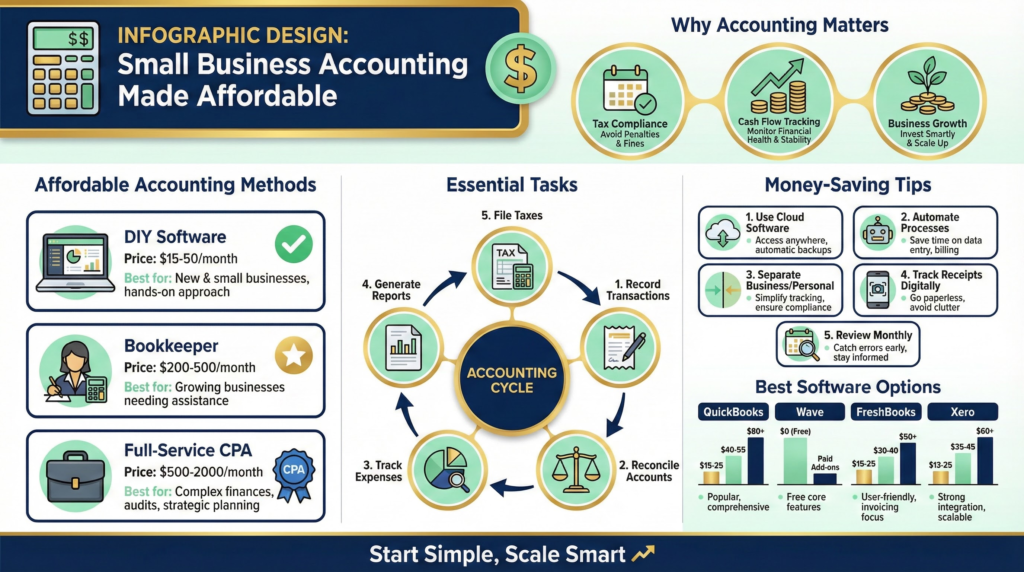
- The DIY Route: Use cloud accounting software (like QuickBooks Online or Xero) to manage everything yourself. Best for: Tech-savvy solopreneurs with simple business models and time to learn.
- The Hybrid Approach (Recommended for Most): You handle the day-to-day data entry (bookkeeping) using software, and hire an accountant or bookkeeper for periodic reviews, tax filing, and complex tasks. This is the sweet spot for affordable Accounting for Small Businesses, balancing cost and expertise.
- The Fully Outsourced Model: Hire a firm to handle everything from data entry to tax filing. Best for: Businesses with complex needs (e.g., inventory, payroll) or owners with zero time or inclination for finances.
3.2. Must-Have Features in Affordable Tools
When evaluating software, ensure it provides:
- Bank & Credit Card Feeds: Automatically imports and categorizes transactions.
- Invoicing & Online Payments: Creates professional invoices and lets clients pay online.
- Basic Financial Reports: Can generate P&L, Balance Sheet, and Cash Flow statements with one click.
- Sales Tax Tracking: Calculates and reports on sales tax collected.
- Receipt Capture: Mobile app to snap photos of receipts.
4. Step-by-Step Guide to Setting Up Your Affordable System
Follow this actionable plan to get your finances in order within 30 days.
4.1. Month 1: Foundation & Setup
- Week 1: Choose Your Core Tool. Research and select your accounting software. Most offer 30-day free trials. For a powerful, scalable option used by millions of small businesses, start a free trial of QuickBooks Online today.
- Week 2: Separate & Connect. Open a dedicated business bank account and credit card if you haven’t already. This is rule #1 for clean books. Connect these accounts to your chosen software.
- Week 3: Chart of Accounts & Invoices. Customize your “Chart of Accounts” (the list of categories for income and expenses). Set up your professional invoice template within the software.
- Week 4: Go Paperless & Reconcile. Start using the receipt capture feature for every expense. Perform your first bank reconciliation by matching your software transactions to your bank statement. Aim to do this weekly or bi-weekly.
4.2. Ongoing Management: The Weekly Rhythm
- Monday: Send outstanding invoices and review the week’s cash flow.
- Wednesday: Enter any uncategorized transactions and snap photos of receipts.
- Friday: Perform a quick reconciliation. Run a “Uncleared Transactions” report to see what’s still pending.
4.3. Quarterly & Annual Must-Dos
- Quarterly: Review your P&L. Use it to calculate and pay your estimated quarterly taxes. Analyze your top expenses. This proactive habit is the heart of strategic, affordable Accounting for Small Businesses.
- Annually: Conduct a full financial review with a professional. Prepare documents for your business tax return. Use this time to set financial goals for the next year.
5. Expert Tips to Save Time & Money
- Embrace Automation: Turn on automatic bank feeds, schedule recurring invoices, and set up payment reminders. Let the software do the repetitive work.
- Schedule a Weekly “Money Date”: Block 30-60 minutes on your calendar each week exclusively for financial admin. Consistency prevents backlog and panic.
- Use a Tax Professional Strategically: Even in a DIY model, paying a CPA or Enrolled Agent to file your taxes is wise. They find deductions you’ll miss and shield you from errors. The fee is an investment, not just an expense. Find a vetted QuickBooks ProAdvisor familiar with your industry through the QuickBooks Find-a-ProAdvisor directory.
- Leverage Free Educational Resources: Platforms like YouTube, the IRS Small Business site, and software provider blogs (like the QuickBooks Blog) offer countless free tutorials on bookkeeping and tax basics.
6. Common Mistakes to Avoid
- Mixing Personal & Business Finances: This creates an accounting nightmare and can pierce your corporate liability veil. Always keep separate accounts.
- Ignoring Receipts: That $75 lunch with a client is a deductible business expense—but only if you have the receipt. Digital capture is your friend.
- Forgetting to Reconcile: Unreconciled accounts are a breeding ground for errors. Small mistakes snowball into major problems.
- Waiting Until Tax Season: Trying to sort out 12 months of finances in April is expensive (your accountant will charge a premium) and stressful. Maintain your books monthly.
- Choosing the Wrong Software Tier: Don’t pay for an advanced “Plus” plan if you only send five invoices a month. Start with a simple plan and upgrade as you grow. Need a simpler, more intuitive alternative? Consider trying FreshBooks, built for service-based businesses and freelancers.
7. Conclusion
Building a solid, affordable Accounting for Small Businesses system is not about luxury; it’s about survival and intelligent growth. It’s the mechanism that tells you if your hard work is translating into profit, ensures you stay compliant with tax authorities, and provides the data to make confident decisions.
The path to affordability lies in the smart hybrid model: leveraging powerful, user-friendly software to handle daily tasks, and strategically engaging professionals for high-level review and tax filing. This approach gives you control without being overwhelmed and expertise without exorbitant cost.
Remember, the goal isn’t perfection—it’s clarity and consistency. Start where you are. Open that business bank account, sign up for a software trial, and commit to your weekly money date. The peace of mind that comes from truly understanding your business’s financial health is priceless, and now, entirely within reach.
Take the first step today. Explore how intuitive accounting software can automate your financial tracking and reporting. Click here to compare top-rated, affordable accounting solutions for your business. Your future self—relaxed at tax time and empowered with financial insight—will thank you.