Meta Description: Discover the ultimate comparison of FreshBooks vs QuickBooks for small businesses. Explore features, pricing, and which tool simplifies accounting for freelancers, retailers, and startups.
Overview
Running a small business often means wearing multiple hats, and managing finances can be one of the most daunting tasks. Whether you’re a solo entrepreneur juggling client invoices, a retail owner tracking inventory and sales tax, a restaurant proprietor handling payroll and tips, or a first-time startup founder navigating basic bookkeeping with limited financial know-how, choosing the right accounting software is crucial. This comparison delves into FreshBooks and QuickBooks, two leading platforms that streamline accounting for small businesses.
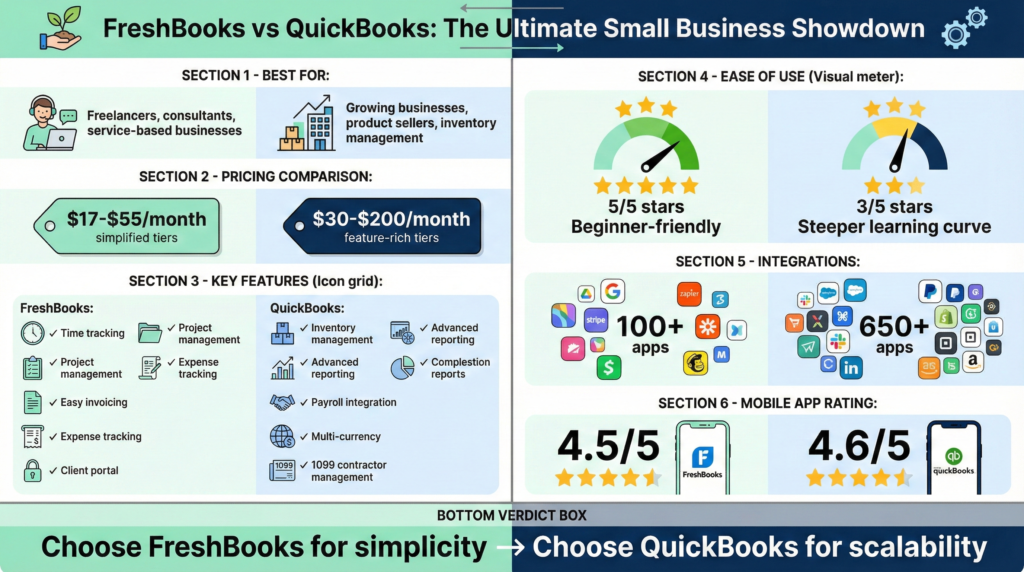
FreshBooks, launched in 2003, is a user-friendly tool for freelancers, service-based professionals, and small teams who value simplicity, automation, and mobile accessibility. Its core strengths lie in streamlining invoicing and expense tracking for users with straightforward accounting needs. In contrast, QuickBooks, developed by Intuit since 1983, offers a more comprehensive suite of features—such as inventory management and advanced financial reporting—making it better suited to small- and medium-sized businesses with more complex accounting requirements. Both platforms address pain points such as tax calculations, bank reconciliation, and the generation of profit-and-loss (P&L) statements to monitor business health, but they differ in the depth and breadth of their features and their ideal user base.
In this article, we’ll compare their features, performance, pricing, suitability for different users, and provide a final recommendation to help you decide which is best for your small business accounting needs.
Feature Comparison
When evaluating accounting software, understanding the differences in feature depth is essential. Both FreshBooks and QuickBooks offer core capabilities, including invoicing, expense tracking, and reporting. However, FreshBooks focuses on ease and automation for smaller businesses, while QuickBooks offers advanced modules, such as inventory and sales tax management, for businesses with more complex requirements.
Invoicing and Billing
FreshBooks excels at invoicing thanks to its intuitive interface. Users can create professional, customizable invoices, automatically add time and expenses, calculate taxes, and set up recurring billing with automated reminders and late fees. It supports online payments via credit cards and ACH, and integrates with Stripe and PayPal, helping accelerate cash flow. QuickBooks also provides strong invoicing tools, allowing creation from photos, PDFs, or emails, with support for multiple payment methods, including Apple Pay, Venmo, and tap-to-pay on iPhone. Its AI agents can automate invoicing from handwritten notes and recommend payment strategies.
For freelancers and service providers, FreshBooks’ seamless integration of time tracking into invoices makes it a standout. QuickBooks, however, offers more advanced options, such as sales orders and progress invoicing, which are better suited to retail or e-commerce businesses.
Expense Tracking and Reconciliation
Both platforms automate expense categorization and bank imports to ease reconciliation. FreshBooks allows mobile receipt scanning, real-time tracking, and automatic data capture from bills, reducing errors in categorizing deductions. This is particularly helpful for solo entrepreneurs who fear penalties for misfiled taxes.
QuickBooks takes it further with AI-driven categorization, the ability to spot inconsistencies, and the organization of bills in one place. It integrates deeply with bank feeds for accurate reconciliation, addressing pain points like mismatched statements. For restaurant owners managing daily cash flow or retail businesses with high transaction volumes, QuickBooks’ robustness shines.
Time Tracking and Project Management
FreshBooks includes built-in time tracking that syncs directly to invoices and projects, ideal for creative freelancers or digital service providers billing by the hour. Project management features help track budgets, collaborate with teams, and monitor profitability.
QuickBooks offers time tracking through its payroll add-on and integrates with project management apps. However, it’s less focused on this compared to FreshBooks, making the latter better for time-based billing.
Payroll and Tax Preparation
Payroll is an add-on for both. FreshBooks’ payroll ($40/mo + $6/user) handles processing, taxes, and integrations. QuickBooks excels here with Auto Payroll and employee benefits such as 401(k) plans and health plans. It also provides automatic tax calculations, including sales tax based on location. This is a boon for hospitality businesses managing tips and complex payroll.
For taxes, both generate reports to simplify quarterly filings. QuickBooks offers more advanced tax prep with forecasts and expert advice, helping alleviate fears of deadlines and penalties.
Reporting and Analytics
Generating P&L statements is straightforward in both, but QuickBooks provides customizable, insightful reports with 90-day forecasts and AI-powered dashboards. FreshBooks offers business health reports, tax-time summaries, and performance dashboards, but they’re more basic than those from other platforms. Startup founders with minimal financial literacy might prefer FreshBooks’ simplicity, while others benefit from QuickBooks’ depth.
Inventory Management
QuickBooks has native inventory tracking, purchase orders, and stock level monitoring, essential for retail and e-commerce owners. FreshBooks lacks this, relying on integrations, making QuickBooks the clear winner for inventory-heavy businesses.
Integrations and AI Tools
FreshBooks integrates with over 100 apps, including payment gateways and CRM tools. QuickBooks boasts 800+ integrations and AI agents for automating tasks, such as reconciling books and managing leads. This makes QuickBooks more scalable for growing businesses.
In summary: FreshBooks prioritizes ease for service-based users by simplifying invoicing, time tracking, and basic bookkeeping. QuickBooks stands out by offering more comprehensive tools for businesses with inventory, payroll, and advanced reporting needs, making it better suited for those with in-depth financial management needs.
Performance Analysis
Performance covers ease of use, speed, reliability, and support—critical for small business owners.
Ease of Use
FreshBooks is renowned for its clean, intuitive interface, even for non-accountants. Users praise its simplicity for invoicing and tracking, with a powerful mobile app for on-the-go management. Reviews on G2 and Capterra average 4.5/5, highlighting how it saves time and reduces errors.
While QuickBooks is feature-rich, it can feel overwhelming for beginners. Its interface is modern but requires a steeper learning curve. User ratings are around 4.3/5, with praise for efficiency but complaints about quirks and navigation issues. For tech-savvy startups, this isn’t a barrier, but freelancers might prefer FreshBooks.
Speed and Reliability
FreshBooks performs quickly for small datasets, with real-time updates and minimal downtime. It’s cloud-based, ensuring accessibility without heavy resource use.
QuickBooks handles larger volumes better, thanks to its robust backend, but some users report refresh issues or slower mobile performance. Both are reliable and offer strong data security.
Customer Support
FreshBooks earns praise for responsive support, rated 4.4/5 on Capterra, covering phone, email, and chat. QuickBooks has expert help but mixed reviews, some citing delays.
In performance, FreshBooks edges out for simplicity, while QuickBooks wins for scalability.
Price Comparison
Pricing is a key factor for small businesses, as they watch every dollar. Both offer tiered plans with discounts for annual billing and trials.
FreshBooks starts at $19/month for Lite (up to 5 clients, basic invoicing and expenses). The Plus plan is $33/month (50 clients, recurring invoices), Premium is $60/month (unlimited clients, accounts payable), and Select has custom pricing (advanced support, lower fees). Annual plans save 10%. There’s 60% off for the first 3 months. Add-ons like payroll cost extra ($40/mo + $6/user). It includes a 30-day money-back guarantee.
QuickBooks Online begins at $38/month for Simple Start (basic invoicing, receipts), $75/month for Essentials (bill management, multi-user), $115/month for Plus (inventory, projects), and $275/month for Advanced (analytics, batch invoicing). Often 50% off for the first 3 months. Payroll is an add-on starting at $50/mo + $6/user. No money-back, but a 30-day free trial.
FreshBooks is cheaper for starters, while QuickBooks’ higher tiers suit complex needs.
If you’re looking to get started with user-friendly accounting for small businesses, try FreshBooks with 60% off your first 3 months.
Best For Different Users
The best choice depends on your business type and pain points.
- Solo Entrepreneurs and Freelancers (25-45, tech-savvy, creative/digital services): FreshBooks is ideal for its ease, time tracking, and invoicing automation. It simplifies tax prep and P&L generation without overwhelming features.
- Small Retail or E-commerce Owners (30-55, inventory/sales tax focus): QuickBooks’ inventory and sales tax tools make it superior, helping reconcile statements and track cash flow amid paperwork overload.
- Restaurant and Hospitality Owners (35-60, payroll/tips/cash flow): QuickBooks handles complex payroll and daily tracking more effectively, with AI for accurate tips and tax calculations.
- First-Time Startup Founders (22-40, technical but low financial literacy): FreshBooks’ intuitive design eases into accounting for small businesses, focusing on basics like expenses and reports.
For scaling businesses, QuickBooks offers more growth potential.
Ready to simplify your finances? Sign up for QuickBooks Online and get 50% off your first 3 months.
Final Recommendation
Ultimately, if your business is service-oriented with simple needs, choose FreshBooks for its ease and affordability—it’ll help conquer tax fears and statement reconciliations without a steep learning curve. For more complex operations, such as inventory or detailed payroll, QuickBooks is the better, scalable option, providing deeper insights into P&L and overall health.
Both are excellent for accounting for small businesses, but assess your specific pain points. We recommend starting with a free trial.
Don’t wait—streamline your bookkeeping today. Explore FreshBooks’ Premium plan with our exclusive discount:
If QuickBooks fits better, claim your discounted subscription here:
For personalized advice, consider consulting an accountant, but either tool will empower your small business journey.