Meta Description: This complete Zoho Books review analyzes features, pricing & ease of use for freelancers, retailers, & startups. See if it solves your tax and bookkeeping pains.
Introduction
For solo entrepreneurs, small retail owners, and first-time founders, the administrative burden of bookkeeping can feel like a second, unpaid job. The fear of tax penalties, the hours spent reconciling bank statements, and the frustration of not having a clear picture of your profitability are universal pain points. In the search for a solution, many businesses turn to cloud accounting software, and Zoho Books consistently ranks among the top contenders.
This review dives into Zoho Books’ features, performance, ease of use, and value for freelancers, shop owners, restaurateurs, and startups. By the end, you’ll see whether Zoho Books will help organize your finances.
Features Overview: What Does Zoho Books Offer?
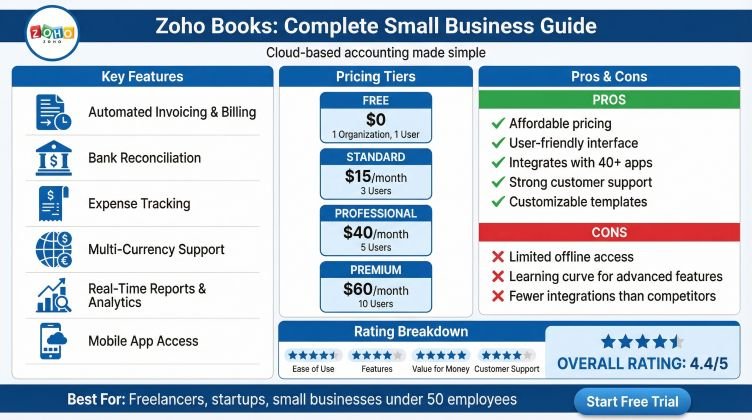
Zoho Books is a feature-rich, cloud-based accounting platform designed for growing small businesses. It’s part of the extensive Zoho ecosystem, which includes CRM, invoicing, and productivity tools, allowing for powerful integrations.
Core Accounting & Automation:
- Automated Bank Feeds: Link accounts to automatically import transactions. Rules automate expense categorization, reducing reconciliation time.
- Invoicing & Payments: Create customizable invoices, send payment reminders, and accept online payments from popular gateways. Retainer invoices and time tracking benefit service businesses.
- Expense Tracking: Snap receipt photos with the app for automatic data capture and mileage tracking, reducing lost deductions.
Tax & Compliance Tools:
- Sales Tax Management: Calculates and tracks sales tax on invoices and generates reports for tax filing.
- Financial Reporting: Instantly create P&L, balance sheet, and cash flow statements for business insights.
Industry-Specific Strengths:
- Retail/E-commerce: Inventory management offers stock tracking, reorder points, and Zoho Inventory integration.
- Restaurants/Hospitality: Includes basic inventory, project tracking, and management of customer deposits and advance payments.
- Freelancers & Startups: Offers project time tracking, client portals, and integration with other Zoho apps.
Performance Analysis: Speed, Reliability & Support
A feature list means nothing if the software is slow or unreliable.
Platform Reliability & Uptime: Zoho Books boasts enterprise-grade infrastructure with a strong track record of uptime. Your data is accessible 24/7 from any device, which is critical for business owners on the go. Occasional, brief maintenance windows are typically scheduled for low-traffic periods.
Speed & Usability Under Load: The interface is generally snappy. For businesses with very high transaction volumes (thousands per month), some users report slight lag when generating complex reports, but for the vast majority of small businesses profiled in this review, performance is more than adequate.
Customer Support: Support is a mixed bag. All plans include email and chat support, with phone support reserved for higher-tier plans. Knowledge base articles and community forums are comprehensive. While support agents are knowledgeable, response times on lower-tier plans can be frustrating during critical periods, such as tax filing. This is a key consideration for those with minimal financial literacy who may need more hand-holding.
Pros and Cons: The Balanced View
Pros:
- ExceptionalOffers highly competitive pricing for solos and small teams, with no hidden fees.User Experience: Clean, intuitive, and logically organized interface. The learning curve is less steep than that of competitors like QuickBooks Online.
- Powerful AuAutomates tedious work with bank rules, recurring invoices, and payment reminders.Bile App: A fully-functional app that allows you to invoice, log expenses, and view reports from anywhere.
- Ecosystem integrates seamlessly with other Zoho apps for a unified management hub. yroll Limitations: Built-in payroll is only available in a few countries (the US, India, and the UAE). Businesses elsewhere need third-party integrations, which can be a hurdle for restaurant owners managing complex tip allocations.
- Support Tiering: The entry-level plan does not include phone support, which may be an obstacle for users who prefer or require immediate phone assistance. Email and chat support is still available, but you may see longer response times.
- Advanced InAdvanced inventory needs require Zoho Inventory (extra cost) or another solution. Experience: Is Zoho Books Easy to Use?
Zoho Books excels at usability. The dashboard presents key metrics—cash flow, income vs. expenses, and overdue invoices—at a glance. Navigation is logical, with a left-hand menu guiding you from Sales to Expenses to Banking.
Onboarding: The setup wizard is helpful, and Zoho provides a sample company for you to explore. For first-time founders with little accounting experience, this sandbox is a safe way to learn.
Daily Workflows:
- A freelancer can track project time, convert a timesheet to an invoice, and send it for online payment in under two minutes.
- A retail shop owner can receive a stock alert, create a purchase order, and later match the bill to the PO with a few clicks.
- A restaurateur can log the day’s cash and card sales, track food supplier payments, and see the week’s gross margin in real-time.
The product’s design prioritizes clarity and simplicity, which helps busy business owners.
Ready to experience the intuitive interface for yourself? <affiliate CTA: Sign up for Zoho Books’ Free Trial here> to explore the dashboard with no commitment.
Value for Money: Pricing & Plans Breakdown
Zoho Books uses a simple, per-organization, per-month plan. Its free option for businesses with revenue under $50K is the best available.
- Free: 1 user, 1,000 invoices/year. Ideal for testing or a solo entrepreneur just starting.
- Standard ($15/month): 3 users, automated workflows, recurring invoices, and more. The sweet spot for most growing freelancers and microbusinesses.
- Professional ($40/month): 5 users, inventory tracking, sales orders, purchase orders, and vendor portals. Perfect for small retail, e-commerce, or service businesses with inventory needs.
- Premium ($60/month): 10 users, custom domains, budgeting, and vendor portal. For established small businesses needing advanced analytics.
- Elite ($120/month) & Ultimate ($240/month): For larger teams with advanced analytics, granular controls, and premium support.
The Professional plan is best for small businesses wanting full features. Compared to the cost of hiring an accountant to clean up your books, the ROI is strong. For the cost of a few coffees, you can take control of your finances.
Struggling with inventory and sales tax? This is likely your best fit and includes a full-featured free trial to validate your choice.
Final Verdict: Who is Zoho Books Best For?
After this complete analysis, Zoho Books emerges as a powerful, user-friendly, and exceptionally cost-effective accounting solution. It is not a one-size-fits-all platform, but it is an excellent fit for specific profiles in our target audience.
Zoho Books is a STRONG RECOMMEND for:
- Solo Entrepreneurs & Freelancers: The free and Standard plans are unbeatable. Time tracking, easy invoicing, and simple expense management solve their core pains.
- First-Time Startup Founders: The intuitive design lowers the barrier to accounting knowledge. Clean financial reporting provides the data needed to make smart business decisions.
- Small Retail/E-commerce Businesses: The Professional plan’s inventory and sales tax tools directly address the overwhelm of paperwork and compliance.
Zoho Books is a GOOD FIT, with a caveat, for:
- Restaurant & Hospitality Owners: Its core accounting, expense tracking, and customer deposit handling are great. However, if you require deep, native payroll with tip management, you’ll need to carefully evaluate the available integrations in your region.
Zoho Books might NOT be the best fit for:
- Businesses that require built-in, complex payroll in unsupported countries.
- Large organizations need deep, granular permissions for dozens of users.
- Businesses are already heavily invested in a competing ecosystem (e.g., Google Workspace with little need for other Zoho apps).
In conclusion, this Zoho Books review finds it to be a top-tier choice for small businesses prioritizing ease of use, automation, and transparent value. It effectively dismantles the pain points of tax fear, messy expenses, and financial obscurity. For a significant majority of our target audience, it provides the perfect bridge between basic spreadsheet accounting and overcomplicated, expensive enterprise software.
Still unsure if it’s the right tool for your specific business? to see a detailed feature breakdown and make the most informed decision for your financial clarity.