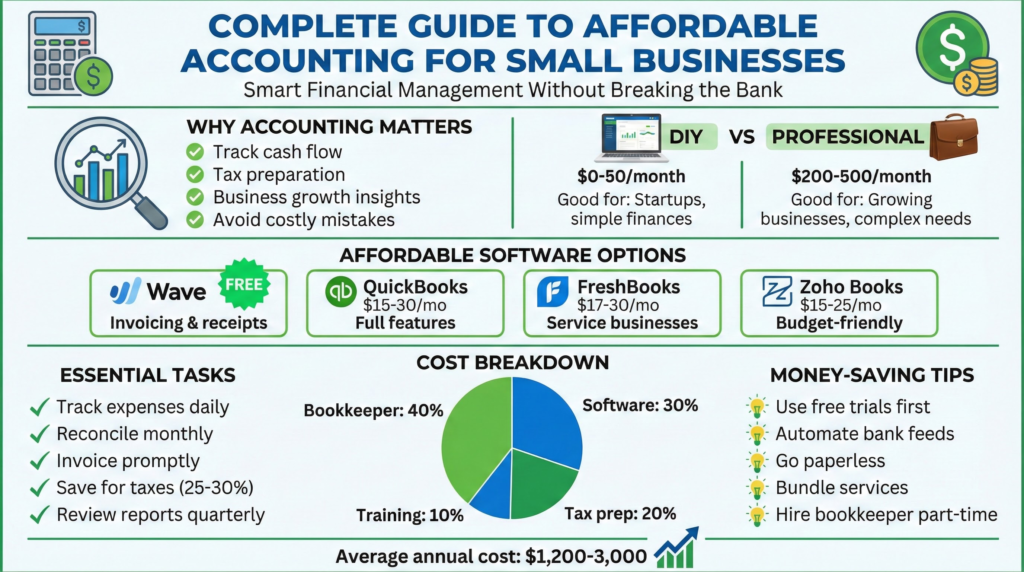
1. Introduction
You launched your business to pursue a passion, serve a community, or build something of your own. You likely didn’t start it to sort receipts, estimate quarterly taxes, or stare blankly at a profit and loss statement.
For many small business owners, accounting feels costly and confusing. Hiring a full-time bookkeeper or high-priced firm can strain a tight budget. Yet ignoring finances is risky—it can lead to cash flow crises, tax penalties, and strategic blind spots.
The good news? In today’s digital age, professional accounting for small businesses is more accessible and affordable than ever. You don’t need an accounting degree or a massive budget—just a clear system, the right tools, and an understanding of the fundamentals.
This guide demystifies the process, comparing cost-effective solutions and providing a practical, step-by-step framework to establish a rock-solid financial foundation.
2. Understanding the Basics: What You Really Need to Know
Before diving into software or services, understand the core components of small business accounting.
2.1. The Three Non-Negotiable Financial Statements
- Profit & Loss (P&L) Statement: Shows revenue minus expenses for a period, resulting in net profit or loss. Answers: “Is my business making money?”
- Balance Sheet: Snapshot of your financial position at a specific point in time. Assets = Liabilities + Equity. Shows your business’s net worth.
- Cash Flow Statement: Tracks actual cash movement. Profit does not equal cash! Helps anticipate shortfalls and plan spending.
2.2. Essential Accounting Terms
- Bookkeeping vs. Accounting: Bookkeeping = daily data entry; Accounting = analysis and reporting.
- Accounts Payable (AP): Money owed to vendors.
- Accounts Receivable (AR): Money owed by customers.
- COGS (Cost of Goods Sold): Direct costs of producing goods/services; critical for gross profit analysis.
3. Key Considerations for an Affordable System
Your approach depends on business complexity, skills, and budget.
3.1. DIY vs. Hybrid vs. Outsourced
- DIY: Manage everything yourself with software like QuickBooks Online or Xero. Best for tech-savvy solopreneurs.
- Hybrid (Recommended): You handle daily bookkeeping; hire an accountant for periodic reviews, tax filing, and complex tasks. Best balance of cost and expertise.
- Fully Outsourced: Firm handles everything. Best for complex businesses or owners with zero time for finances.
3.2. Must-Have Features in Affordable Tools
Ensure software provides:
- Bank & Credit Card Feeds – automatic transaction import.
- Invoicing & Online Payments – professional invoices, client payment options.
- Basic Financial Reports – P&L, Balance Sheet, Cash Flow with one click.
- Sales Tax Tracking – automatic calculations and reporting.
- Receipt Capture – mobile app for snapping photos of receipts.
4. Step-by-Step Guide to Setting Up Your Affordable System
4.1. Month 1: Foundation & Setup
- Week 1 – Choose Your Core Tool: Most software offers 30-day free trials. For a powerful, scalable option: Start a free trial of QuickBooks Online.
- Week 2 – Separate & Connect: Open a dedicated business bank account and credit card. Connect to your software.
- Week 3 – Chart of Accounts & Invoices: Customize categories for income and expenses. Set up a professional invoice template.
- Week 4 – Go Paperless & Reconcile: Use receipt capture and perform your first bank reconciliation weekly or bi-weekly.
4.2. Ongoing Management: Weekly Rhythm
- Monday: Send invoices, review cash flow.
- Wednesday: Enter uncategorized transactions, snap receipts.
- Friday: Quick reconciliation; check “Uncleared Transactions” report.
4.3. Quarterly & Annual Must-Dos
- Quarterly: Review P&L, calculate estimated taxes, analyze top expenses.
- Annually: Full financial review with a professional; prepare tax documents; set next year’s financial goals.
5. Expert Tips to Save Time & Money
- Embrace Automation: Bank feeds, recurring invoices, payment reminders.
- Schedule a Weekly “Money Date”: 30–60 minutes for financial admin.
- Use a Tax Professional Strategically: CPA or Enrolled Agent for tax filing is worth the investment. Find a ProAdvisor.
- Leverage Free Resources: YouTube, IRS Small Business site, and provider blogs (QuickBooks Blog) for tutorials.
6. Common Mistakes to Avoid
- Mixing personal & business finances.
- Ignoring receipts.
- Skipping reconciliations.
- Waiting until tax season.
- Choosing the wrong software tier. Consider FreshBooks for a simpler, service-focused option: Try FreshBooks.
7. Conclusion
Affordable accounting is about survival and growth, not luxury. Use a hybrid model: software for daily tasks, professionals for high-level review.
Start today: open a bank account, sign up for a software trial, and commit to a weekly “money date.” Clarity, consistency, and financial insight are priceless.
Take the first step: Compare top-rated, affordable accounting solutions