1. Introduction
For a solo entrepreneur, the sight of a spreadsheet filled with uncategorized expenses can be paralyzing. For a restaurant owner, the nightly ritual of tallying cash, card payments, and tips is a drain on precious time. The common thread? The foundational, yet daunting, task of managing your business’s finances.
In the realm of accounting for small businesses, QuickBooks Online (QBO) has been dominant for years. But as we move into 2026, the landscape is more competitive, and the needs of modern business owners are more specific. Is the latest iteration of this cloud-based accounting powerhouse still the gold standard, or has it been overtaken by simpler, more affordable alternatives?
This comprehensive review dives deep into QuickBooks Online 2026. We’ll analyze its newest features, scrutinize performance, and evaluate whether it delivers genuine value for the solo freelancer, bustling shop owner, demanding restaurateur, and ambitious startup founder. By the end, you’ll have a clear verdict on whether QBO 2025 is the right tool to transform your financial chaos into clarity.
2. Features Overview: What’s New and Tried-and-True
QuickBooks Online 2026 builds upon its robust foundation with AI-driven enhancements and workflow refinements designed to save you more time.
2.1. Core Accounting & Bookkeeping
- Automated Transaction Categorization: QBO now learns from your past categorizations with remarkable accuracy, reducing manual data entry. Link your bank accounts and credit cards, and watch as expenses and income are sorted automatically.
- Smart Invoicing & Payments: Create professional, customizable invoices in seconds. The 2026 update introduces more template flexibility and automated payment reminders. Clients can pay via credit card, ACH, or PayPal.
- Expense Tracking & Receipt Capture: Use the mobile app to snap receipts. QBO’s OCR extracts vendor, date, amount, and category, matching them to corresponding bank transactions.
2.2. Tax Compliance & Reporting
- Automated Sales Tax Calculations: Critical for e-commerce and retail. Set up tax rules by location; QBO calculates rates automatically and generates ready-to-file reports.
- Quarterly Tax Estimations: Based on your P&L, QBO provides estimated quarterly tax payments, avoiding underpayment penalties.
- Deduction Finder: Scans your expenses to highlight potential tax deductions you might have missed.
2.3. Advanced Features for Specific Needs
- Inventory Management (Essentials & Plus): Track inventory quantities, values, and receive low-stock alerts. Updates COGS automatically.
- Time Tracking & Project Profitability: Track billable hours per client/project and see profitability on a dedicated dashboard.
- Payroll Integration (Additional Cost): Full Service Payroll handles wages, taxes, tips, and direct deposit, filing automatically. Essential for restaurants/hospitality.
3. Performance Analysis: Speed, Reliability, and Support
- Platform Speed & Uptime: QBO 2026 feels snappier, with faster dashboard loads and report generation. Uptime consistently above 99.9%.
- Mobile App Experience: Full-featured iOS and Android apps allow invoicing, receipts, cash flow checks, and basic reporting.
- Customer Support: Extensive articles, tutorials, and forums. Phone support wait times vary; higher-tier plans get priority support.
4. Pros and Cons
Pros
- Unmatched Ecosystem: Invoicing, expense tracking, reporting, and tax prep are industry-leading.
- Superior Third-Party Integrations: Connects with 750+ apps (Shopify, Square, PayPal, Gusto, TSheets).
- Scalability: Handles inventory, complex projects, and multi-state payroll.
- Proactive Tax Tools: Sales tax and estimated tax features reduce anxiety around deadlines.
Cons
- Cost Creep: Monthly fees plus add-ons (payroll, payments) can add up.
- Learning Curve: The number of features requires an initial time investment.
- Support Inconsistency: Timely access to expert support can be a challenge on lower-tier plans.
5. User Experience: Who Is It Best For?
- Solo Entrepreneurs & Freelancers: A+ – Perfect for time tracking, invoicing, and quarterly tax estimates. Simple Start plan often sufficient. Special QuickBooks Simple Start Offer
- Small Retail/E-commerce Owners: A – Inventory tracking and automated sales tax are lifesavers. Essentials or Plus recommended.
- Restaurant/Hospitality Owners: B+ – Robust payroll with tip handling and daily sales dashboards. Cost is higher but time saved is worth it.
- First-Time Startup Founders: B – Learning curve exists, but early accounting setup ensures proper financial reporting.
6. Value for Money: Pricing Tiers
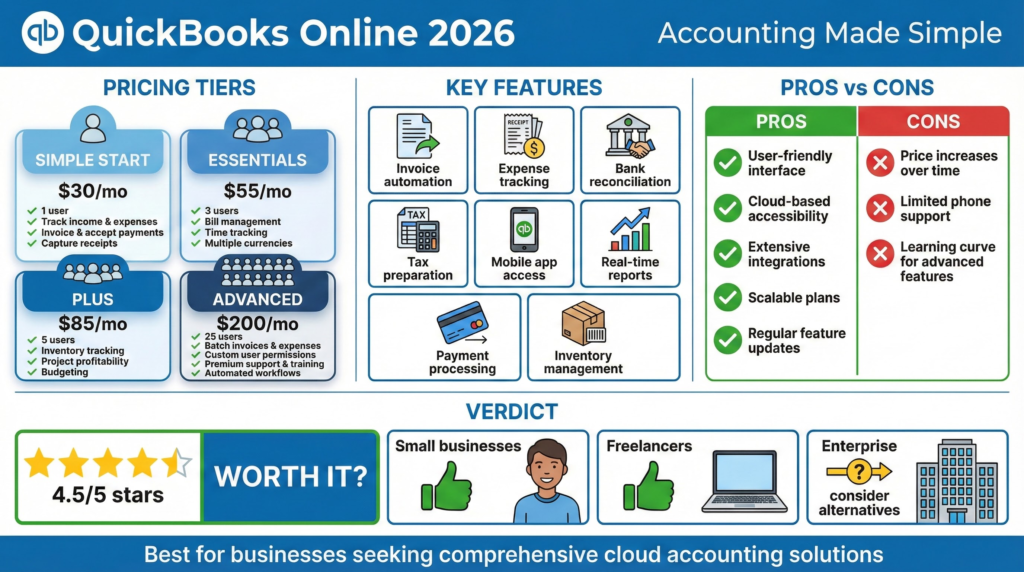
- Simple Start ($30/month): Freelancers; income/expense tracking, invoicing, basic reports.
- Essentials ($60/month): Adds bill management and time tracking; good for service businesses.
- Plus ($90/month): Inventory tracking, project profitability; best for product-based businesses.
- Advanced ($200/month): Batch invoicing, enhanced analytics, premium support; for larger SMBs.
Worth it? For most SMBs, yes. Automation, time savings, and accurate tax tracking often outweigh monthly fees. Micro-businesses with few transactions may find simpler alternatives sufficient.
Compare all QuickBooks plans here
7. Final Verdict
QuickBooks Online 2025 remains the most comprehensive and intelligent solution for small business accounting.
Not the cheapest or simplest initially, but unmatched depth, automation, and integration ecosystem directly address tax fear, reconciliation chaos, and reporting blindness.
Best for: Solopreneurs, shop owners, and startup founders seeking clarity, efficiency, and compliance. Initial learning curve is a small price for long-term confidence.
Ready to transform your finances? Explore QuickBooks Online offers and start your trial